0%
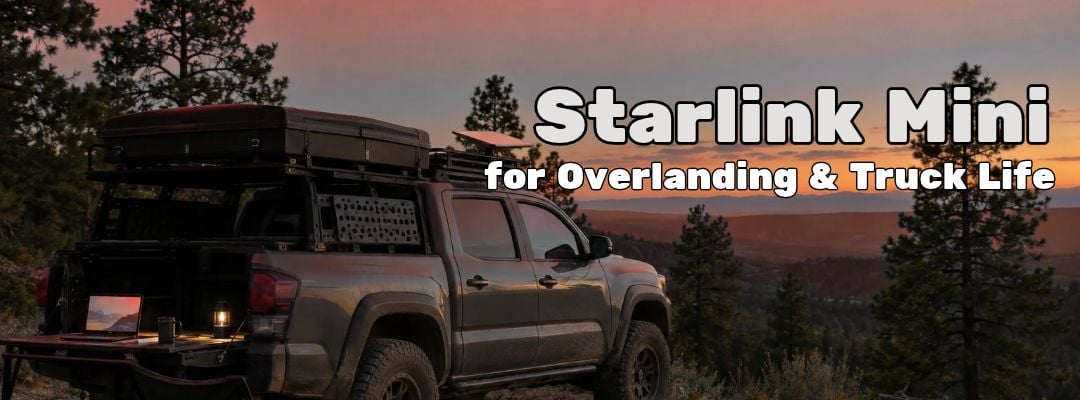
Everyone posts the photo of the dish sitting on the hood. Nobody posts what happens when you drive under trees.
Here is what happens. You are rolling down a forest service road at dusk, the passenger is on a video call, and the Starlink Mini on the crossbars is pulling 150 Mbps. Then the canopy closes overhead. The call freezes. The app shows obstructed. Two minutes later you break into a clearing, the dish finds a satellite, and the call comes back. Then the trees close again.
That is not a defect. That is physics. And once you understand it, the Starlink Mini becomes the best piece of overland gear you own.
This is a field guide to running the Starlink Mini from a vehicle: what is in the box, what you still have to buy, where to mount it, how much power it really pulls, what the rules say about using Starlink while driving, and the mistakes we see every week. Real numbers, real mounting positions, real failure modes.
What Is in the Starlink Mini Kit (and What You Still Need to Buy)
Open the standard Starlink Mini kit and you get, per Starlink's own spec sheet:
- The Starlink Mini with integrated Wi-Fi router
- Kickstand
- Pipe adapter and flat mount
- DC power cable, 15 m (49.2 ft)
- Power supply (AC wall brick)
- Starlink Plug
The dish itself is 11.75 x 10.2 x 1.45 inches and weighs 2.43 lb (1.1 kg), or 2.56 lb with the kickstand. It is rated IP67, operates from -22°F to 122°F, stays operational in 60+ mph wind, and can melt up to 1 inch of snow per hour. It covers up to 1,200 square feet with Wi-Fi and handles up to 128 devices. At the time of writing, the Starlink Mini is $299 on our Starlink page.
That box gets you online at a campsite. It does not get you set up on a truck. The honest list of extras:
- A real vehicle mount. The kickstand is for the ground or a picnic table. For the roof, you want a crossbar or rack mount. Our Starlink Mini Travel Mount Bundle pairs the Mini with a tool-free flat rail mount that clamps 20 to 80 mm bars, plus a 10 m cable.
- A 12V power path. The Mini runs on DC, so you do not need the wall brick in the truck. The Starlink Mini with Car Adapter Cable adds a 3 m 12V cable for the accessory socket.
- A power source that is not your starting battery. A dual battery system or a portable power station. More on why below.
- Cable management. Grommets, clips, and a clean entry point into the cab.
- A case. The Mini is tough, but a loose dish bouncing around a truck bed is not. A hard case like our Starlink Mini Secure Transport Case keeps it from getting crushed under recovery gear.
If you want it all in one box, our Starlink Mini kit bundles pair the dish with charging, solar, and case options.

Field of View Is the Whole Game
This is the section that separates the people with reliable internet from the people posting angry reviews.
The Starlink Mini is an electronic phased array. It does not physically track satellites. It steers its beam electronically inside a cone of sky. Starlink lists that field of view at 110 degrees. Lay the dish flat and do the math: 180 minus 110 leaves 70 degrees, split across both sides. The Mini does not use the bottom 35 degrees of sky in any direction.

Eric, our Starlink lead, gives the same rule for performance panels: they ignore the first 20 degrees off the horizon and work primarily looking 40 degrees and up. Either way, the lesson is the same. The dish lives on the sky directly above it, not the sky at the horizon.

Now translate that to your rig. Anything that rises above the dish within that cone steals satellites. To check, measure how high an obstacle stands above the dish and how far away it is, then work out the angle:
| Obstruction | Height above dish | Distance | Angle it blocks up to |
|---|---|---|---|
| Open clamshell roof tent | 4 ft | 3 ft | 53° |
| Cargo box next to the dish | 1.5 ft | 2 ft | 37° |
| 40 ft pine | 33 ft | 40 ft | 40° |
| 60 ft fir | 53 ft | 30 ft | 60° |
| Canyon wall | 300 ft | 500 ft | 31° |
Read that table carefully. A canyon wall 500 feet away barely touches the useful sky. A roof tent 3 feet away takes a huge bite. The thing closest to the dish often does the most damage.
What this means in the field:
- Tree canopy is the number one killer. Under dense cover, the Mini will drop in and out as satellites pass behind trunks and branches. Park in a clearing, or run the 15 m cable to put the dish on its kickstand in the open while the truck stays in the shade.
- Tall rigs and roof tents steal sky from their own dish. Mount the dish at the highest point of the vehicle, ahead of or above the tent and cargo boxes.
- Canyons are better than you think. Wide canyons often work fine. Slot canyons and tight switchback roads do not.
- Use the obstruction check in the Starlink app before you commit to a campsite. It takes a few minutes and saves an evening of buffering.
Starlink Mini Mount Options on a Vehicle
Eric's professional install process for buildings is a good model. A field engineer runs a paid site survey: signal hunting, RF mapping, checking roof penetrations and conduit runs, then picking the best location, whether that is a ridgeline, eave, sidewall, pole, or non-penetrating mount on a flat roof.
On a truck, you ask the same three questions:
- Where is the clear sky? Usually the highest flat surface, forward of anything tall.
- Where does the cable enter? It needs a protected path into the cab or camper without getting crushed.
- What survives 70 mph? Wind load, vibration, washboard roads, and the occasional low branch.
Here are the Starlink Mini mount setups we see work, from simplest to most permanent:
- Kickstand on the ground (parked only). Zero install. Use the full 15 m cable to put the dish in the best patch of sky at camp. This is the most reliable setup in timber because you can move it.
- Crossbar or flat rail mount. The everyday overland answer. Clamps to rack bars, comes off in minutes, keeps the dish above the roofline.
- Pipe adapter on a pole or ladder. The included pipe adapter fits pole mounts. Good for RV ladders and trailer tongues, and for getting the dish above a roof tent.
- Permanent roof mount. For full-time truck life. Cleanest cable run and fastest setup, but plan the drill holes like an installer would, with a sealed gland where the cable enters.
One honest warning on highway use. The spec sheet rates the Mini as operational in 60+ mph wind. Highway speed plus a headwind can push past that number. If the dish is going to ride at speed, use a purpose-built, rated mount, keep it as low-profile as the sky allows, and check the hardware every fuel stop. Starlink's own support pages warn that improper installation can void your warranty if the equipment is damaged while moving.
Starlink Mini Power Consumption: What It Really Pulls
Starlink lists the Mini's average power consumption at 25 to 40 watts. The input rating is 12 to 48 volts DC, 60 W. It can also run from USB-C Power Delivery, but Starlink calls for a 100 W supply (20 V / 5 A minimum) with its USB-C to barrel jack cable accessory. A small phone power bank will not cut it.
Here is what that means in hours. These estimates assume about 85% of rated capacity is usable after conversion losses:
| Power source | At 40 W | At 25 W |
|---|---|---|
| 100 W USB-C power bank, 25,000 mAh (about 90 Wh) | about 2 hrs | about 3 hrs |
| 256 Wh power station | about 5 hrs | about 9 hrs |
| 500 Wh power station | about 10 hrs | about 17 hrs |
| 1,000 Wh power station | about 21 hrs | about 34 hrs |
| 100 Ah LiFePO4 aux battery (1,280 Wh) | about 27 hrs | about 43 hrs |
A few field rules on power:
- Do not run it off your starting battery overnight. At 40 W, the Mini pulls a little over 3 amps from a 12V system. Ten hours is more than 30 amp-hours. On a typical starting battery, that can be the difference between a quiet morning and a dead truck 40 miles from pavement.
- Go DC direct. Plugging the AC wall brick into a power station's inverter means converting DC to AC and back again, and you pay for that in wasted watts. A 12V cable straight from the battery is more efficient.
- Watch voltage sag. The Mini needs at least 12 volts. A tired battery under load can dip below that and the dish may reboot. A DC-DC charger or a lithium aux battery holds voltage better.
- Solar extends the trip. A panel on the roof or a folding panel at camp can keep a power station topped off through the day.

Starlink While Driving: In Motion vs. Parked
This is the question we get most, and the one where you will find the most conflicting answers online. Here is what Starlink's support documentation says right now.
Starlink Roam, Local Priority, and Global Priority plans support in-motion use up to 100 mph in authorized locations. In-motion use is not permitted on any Residential plan, under Starlink's Fair Use Policy. Standby Mode is not intended for in-motion use either. Some countries prohibit in-motion use on land entirely, so check before you cross a border.
On hardware, the Mini has no motors, which is the kind of Starlink the in-motion rules are written around. Starlink specifically warns against using actuated, motorized models while moving.
So yes, Starlink mobile use is real, but set your expectations honestly:
- Open highway and desert: Excellent. Passengers can stream and work.
- Tree-lined roads, overpasses, tunnels, tight canyons: Expect drops every time the sky closes. Email and messages catch up. Video calls do not.
- The driver does not touch the app. Set it up before you roll.
If your plan is a Residential subscription and you want Starlink for car travel, fix the plan before the trip. Using Starlink while driving on the wrong plan puts you out of policy.
Picking the Right Plan

Starlink plans come in two families, and full-time travelers pick the wrong one constantly.
Priority and business plans put your traffic ahead of residential and consumer users on the network when it gets congested. They also come with specific IP ranges and 24/7/365 priority phone support (Eric). Local Priority and Global Priority both allow in-motion use. See our Starlink service plans for current options.
True unlimited data is not part of priority business plans. If you want unlimited for streaming and gaming, that is a consumer subscription bought direct from Starlink (Eric). On the consumer side, Starlink's Roam plans allow in-motion use. Residential plans do not.
So which one does a full-time traveler actually want?
- If you stream a lot, mostly stay in your home country, and can live with lower priority at busy times: a consumer Roam plan direct from Starlink.
- If you make your living from the road, cross borders, need consistent speed when everyone else is online, and want a human on the phone at 2 a.m.: a Priority plan. Budget your data, because it is not unlimited.
Weather in the Field
Rain and cloud degrade throughput. They rarely sever the link. In a storm you will usually keep email and messaging moving while video calls stutter and drop.
The part almost nobody publishes: Starlink satellites and terminals automatically raise and amplify their power levels to push through cloud, and the dish uses that energy to melt ice and snow on its face (Eric). The Mini is rated to clear up to 1 inch of snow per hour. Wet, heavy snow piling faster than that, or a dish buried under a drift, is a different story. Brush it off.
What to Pair It With When the Trip Goes Wrong
The Starlink Mini is a bandwidth device. It has no SOS button and no direct route to rescue, and it stops the moment your power does. For the day the truck rolls or someone gets hurt, carry a dedicated emergency device on your body, not in the vehicle. Something like a Garmin inReach Mini 2 or a PLB weighs a few ounces and works with no truck, no battery bank, and no dish.
Common Starlink Mini Setup Mistakes
These are the calls we take every week:
- Mounting too low. A dish below the roof tent or beside a cargo box is fighting its own vehicle for sky.
- Pinching the cable in a door seal. It works for a week, then the jacket wears through. Route it through a grommet, window gap kit, or sealed gland.
- Shading the dish with an open roof tent. Pop the tent and you just took the dish from 35 degrees of blind sky to more than 50.
- Running it off the starting battery. See the power section. Then add a dual battery or power station.
- Running the AC brick through an inverter. It works. It also burns watts you will want at 2 a.m.
- Expecting unlimited data on a Priority plan. Priority means priority, not unlimited.
- Using a Residential plan on the road. No in-motion use, and you can end up out of policy.
- Skipping the obstruction check. Five minutes in the app beats a night of buffering.
- Leaving it inside the cab. The Mini needs a direct view of the sky. Glass degrades the signal, and a metal roof blocks it.
Is the Starlink Mini Worth It for Overlanding?
For most people who spend real time off pavement, yes. Starlink for overlanding turns a dead-zone campsite into a workplace, a weather station, and a phone booth home. The Mini is small enough to pack, light enough to hand-carry to a clearing, and frugal enough to run off a decent power station overnight.
It just works best when you respect three things: open sky, clean power, and the right plan.
Not sure yet? Our Starlink Mini rental lets you test the setup on a real trip before you buy. And because we carry the largest satellite inventory in the business, the Mini, mounts, and cables are usually in stock when others are back-ordered.
Preparation isn't paranoia. It's smart. Map your sky, wire your power, and the internet will be waiting when you set up camp.
FAQ
Does Starlink Mini work while driving?
Yes, on the right plan. Starlink says Roam, Local Priority, and Global Priority plans support in-motion use up to 100 mph in authorized locations. Residential plans do not allow it. Mount the dish securely with a rated mount, and expect drops under trees, overpasses, and in tunnels.
How much power does Starlink Mini use?
Starlink lists the Mini's average power consumption at 25 to 40 watts, with a 12 to 48 volt DC input rated at 60 W. From USB-C, it needs a 100 W Power Delivery source (20 V / 5 A minimum). A 500 Wh power station runs it for roughly 10 to 17 hours.
Can Starlink Mini work under trees?
Partly, and not reliably. The Mini uses a 110 degree cone of sky above it, so dense canopy blocks satellites and causes repeated dropouts. Light, scattered trees may be workable. The fix is to park in a clearing or run the 15 m cable and set the dish on its kickstand in open sky.
Do I need a special plan for Starlink Mini in a vehicle?
For use while moving, yes. In-motion use requires a Roam, Local Priority, or Global Priority plan. Residential plans do not permit it. If you only use the Mini parked at camp, plan choice comes down to data, priority, and where you travel.
Is Starlink Mini worth it for camping?
For remote work, weather, maps, and staying in touch, yes. At 2.43 pounds with built-in Wi-Fi and a 25 to 40 watt draw, it is the easiest Starlink to pack. Budget for a mount, a power source, and a separate emergency device, because the Mini cannot call for rescue.